
For every glowing review of a new translator device online, there is a quieter review pointing out that the writer was disappointed within a month. This category attracts casual buyers because the promise sounds simple — press a button, hear a translation — and marketing generally reinforces that simplicity. What the marketing rarely mentions is the surprising number of ways this purchase can go sideways. Buyers get burned when the language they actually need is under-supported, when the microphone struggles in real environments, when the offline mode turns out to be a small subset of the full feature set, or when firmware updates simply stop arriving after the first year. None of those failures show up in the box, and most do not appear until the device is well outside its return window. This article walks through the specific mistakes that repeat most often across buyer feedback, and the checks that would have caught each one before purchase. Reading it first can save both the money and the frustration of learning these lessons the expensive way.
The Marketing Traps Most Buyers Fall Into
Marketing for translator devices tends to lean on three numbers: languages supported, translation speed, and battery life. All three sound like meaningful specifications, and all three can be technically true while being practically misleading. A device that supports one hundred languages may only actually perform well in twenty of them; the rest are functional demos rather than production-quality models. Translation speed measured in ideal conditions rarely survives contact with noisy environments. Battery life reported in standby mode dramatically overstates continuous-use hours. Before considering the price, treat any headline number as a starting point for questions rather than a claim to accept at face value. Retailers rarely explain the gap between the marketing number and the daily-use number, so the burden of asking that question falls on the buyer.
The second trap is the demo video. Every vendor shoots demos with slow, clear speakers, quiet rooms, and pre-selected sentences that flatter the model. That is not fraud; it is the standard of the industry. But it is also not evidence of daily performance. If a vendor cannot show video of the device handling a fast-paced conversation between two native speakers in a noisy setting, assume the device has not been thoroughly tested there. A capable ai translator device should not need staged conditions to look good, and vendors confident in their hardware are usually willing to publish less polished field recordings on request. Silence in response to that request is itself an answer, and often the most useful one a buyer will receive before payment.
Technical Pitfalls Hiding in the Spec Sheet
Beyond marketing, several specification-level pitfalls tend to escape scrutiny during the excitement of a purchase decision. These are not obscure; they are simply not covered by the standard comparison charts on retail pages. Learning to read the fine print before buying separates satisfied owners from returners. The two most consistent traps are inflated language coverage and misleading offline capability, and both deserve direct questions to the vendor before the purchase is finalized.
Language Coverage That Sounds Impressive but Is Not
Language counts are the easiest thing to inflate. A device advertised for one hundred languages might use full neural models for the top-tier languages, lightweight models for the mid-tier, and simple pass-through translation for the long tail. In practice, that means the language you actually need might work beautifully — or might be nearly unusable. Ask the vendor which languages are handled by dedicated speech recognition and which are routed through generic engines. A separate but related pitfall is dialect coverage. Mandarin and Cantonese are often bundled under Chinese despite being effectively different languages for spoken purposes. Arabic dialects vary widely by region, and Spanish behaves differently in Madrid versus Buenos Aires. A device that treats these as one label may work poorly for a specific traveler even when the language name appears on the box.
Offline Modes That Are More Limited Than Advertised
Offline capability is one of the most misrepresented features in the category. Many devices advertise offline translation but silently drop features when disconnected — reducing supported languages, dropping speaker separation, or falling back to a lower-quality model. For travelers who buy the device specifically for airplanes, remote areas, or countries with restricted internet, this discovery is painful. The check is simple: ask for the offline feature matrix, not just the offline language list. If the vendor cannot produce one, assume the offline mode is a trimmed version of the online experience rather than a peer of it. A reliable indication of a serious offline implementation is whether the device works with airplane mode active from the moment it is unboxed, without requiring a first-time online setup that itself contradicts the offline promise.
Practical Buying Checks Before You Commit
The best defense is a short practical checklist you run before payment. First, test the specific language pair you need most, in the actual noise level of your typical environment. If the vendor allows in-store demos, bring a friend who speaks the target language natively and simulate a real conversation rather than reading from cards. If the purchase is online, buy from a retailer whose return policy covers translation-quality issues, not just hardware defects. This first check filters out most of the disappointment before the box has even been opened, and it costs nothing beyond a few minutes of preparation.
Second, look at update history. A device that has received regular firmware updates for two years is a much safer purchase than one that shipped promising updates that never materialized. Companies focused on this category, including INNAIO, publish visible update timelines because their customers include repeat travelers who evaluate long-term reliability rather than one-time buyers. That transparency is a proxy for long-term product health, and its absence is often a leading indicator that the model has been quietly deprioritized inside the company.
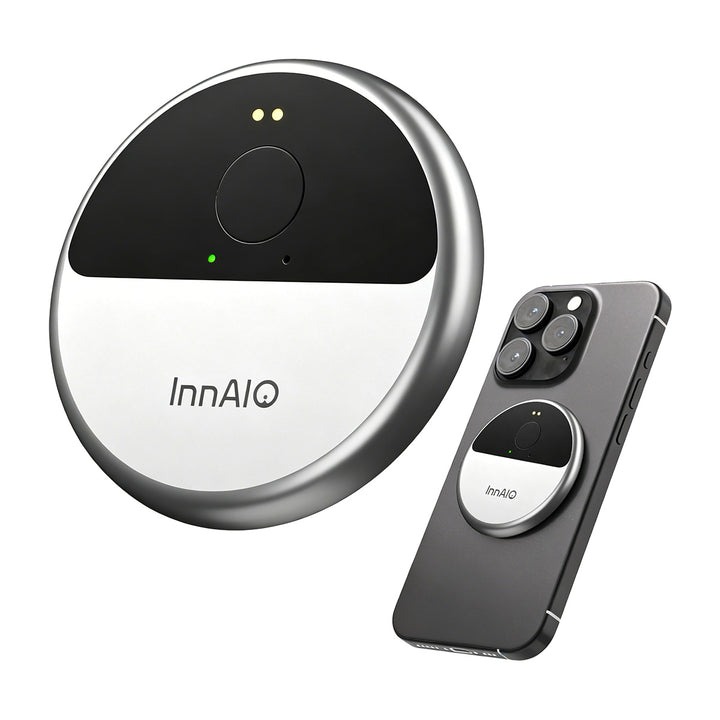
Third, examine the ecosystem around the device — the companion app, the cloud service reliability, and customer support responsiveness. A great device attached to a broken app is still a bad daily experience. Read app-store reviews and look specifically for comments about crashes, sync failures, or missing features on either iOS or Android. Fourth, check the warranty and repair path in your country before purchase. Devices that require international shipping for warranty service can be practically unrepairable, even when technically covered. Each of these checks costs minutes; missing any of them can cost the full price of the device plus the frustration of relearning the same lesson later.
Buying Smarter Next Time
Every translator category has its share of regret purchases, and the pattern behind them is consistent — attractive marketing on the front, practical shortcomings that only surface later, and a return window that closed before those shortcomings had time to appear. The remedy is not skepticism for its own sake; it is a small set of concrete checks run before purchase rather than after. Test the specific language pair you actually need, in the specific environment where you plan to use the device. Confirm the offline experience matches what the marketing implies, not just what the language list suggests. Read the update history for the vendor. Verify the app and support ecosystem. None of these checks are difficult, but running them separates the happy long-term users from the drawer-full-of-gadgets crowd. A device chosen this way is far more likely to still be in daily use twelve months later, which is the only real success metric for a purchase this personal.