
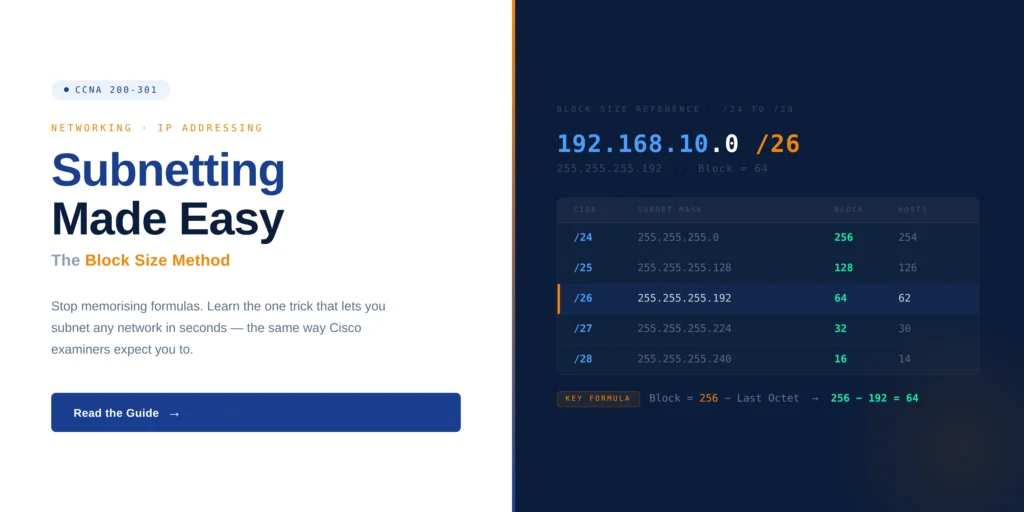
Subnetting is one of the first topics that feels difficult for many CCNA learners. At the beginning, the IP addresses, subnet masks, ranges, and broadcast addresses can look confusing. But once you understand the basic idea, subnetting becomes much easier.
Subnetting is used to divide a large network into smaller parts. This helps network engineers manage devices, reduce unwanted traffic, improve security, and troubleshoot problems faster. If you are preparing through a CCNA Networking Certification Course, subnetting is one topic you should understand clearly because it connects with routing, VLANs, DHCP, and IP addressing.
Why Subnetting Is Important in CCNA
CCNA is not only about learning commands. It also tests whether you understand how networks are planned and managed. Subnetting helps you understand how devices are grouped inside a network and how traffic moves from one network to another.
For example, in an office, the HR team, sales team, IT team, and guest Wi-Fi users should not all be placed in the same network. If everyone is in one large network, traffic becomes messy and troubleshooting becomes harder. Subnetting helps divide these users into separate networks so everything becomes easier to control.
What Subnetting Means in Simple Words
Every IPv4 address has two parts. One part identifies the network, and the other part identifies the device inside that network. The subnet mask tells the device which part is the network and which part is the host.
Think of it like a street address. The street name tells you the area, and the house number tells you the exact house. In the same way, the network part tells where the device belongs, and the host part tells which device it is inside that network.
Why Networks Are Divided Into Subnets
A large network can create many problems. Broadcast traffic can reach too many devices. Security rules become difficult to apply. One issue can affect many users. It also becomes hard to find where a problem is happening.
Subnetting solves this by creating smaller networks. Each department or group can have its own subnet. HR can have one subnet, sales can have one subnet, IT can have one subnet, and guest users can have another subnet. This makes the network cleaner and easier to manage.
The block size method is one of the easiest ways to understand subnetting. It helps you find subnet ranges without making the calculation too complicated.
The basic formula is simple:
Subtract the subnet mask value from 256.
For example, if the subnet mask is 255.255.255.192, the important value is 192.
256 minus 192 is 64.
So the block size is 64.
This means the subnet ranges will move like this:
192.168.1.0
192.168.1.64
192.168.1.128
192.168.1.192
Once you understand this pattern, subnetting becomes much easier.
Simple Block Size Example
Let us take this example:
Network: 192.168.1.0
Subnet mask: 255.255.255.192
The block size is 64.
So the subnet ranges are:
192.168.1.0 to 192.168.1.63
192.168.1.64 to 192.168.1.127
192.168.1.128 to 192.168.1.191
192.168.1.192 to 192.168.1.255
In the first subnet, 192.168.1.0 is the network address. The usable IP addresses are 192.168.1.1 to 192.168.1.62. The broadcast address is 192.168.1.63.
In the second subnet, 192.168.1.64 is the network address. The usable IP addresses are 192.168.1.65 to 192.168.1.126. The broadcast address is 192.168.1.127.
Network Address, Usable IP, and Broadcast Address
In every subnet, the first address is called the network address. This address is used to identify the subnet. It cannot be given to a computer or any device.
The last address is called the broadcast address. It is used to send traffic to all devices inside that subnet. This address also cannot be given to a device.
The addresses between the network address and broadcast address are usable IP addresses. These can be assigned to computers, printers, servers, routers, and other devices.
Real Office Example of Subnetting
Imagine a small company with three teams. HR handles employee records. Sales handles customer work. IT manages systems and support. If all these teams are placed in one network, there may be more broadcast traffic and less control.
By using subnetting, each department can have its own designated IP range. The HR department can operate on one subnet, while the sales department uses a different one, and IT can have another separate subnet. This setup simplifies the implementation of security protocols and facilitates the identification of issues.
For instance, if the sales team is unable to connect to the network, the engineer can start by examining the sales subnet. There’s no need to investigate the entire company network right away. This approach helps to expedite the troubleshooting process.
How Subnetting Connects With VLANs
In CCNA, VLANs and subnetting are closely connected. A VLAN is used to separate devices logically inside a switch. A subnet is used to give that VLAN its own IP range.
For example, VLAN 10 can be used for HR, and it can have the subnet 192.168.10.0. VLAN 20 can be used for sales, and it can have the subnet 192.168.20.0. This makes the network organized and easier to manage.
How Subnetting Helps With DHCP
DHCP gives IP addresses automatically to devices. But DHCP needs a proper IP range to work correctly. That IP range comes from subnetting.
If the subnet is planned wrongly, devices may get wrong IP addresses. They may not communicate properly with the gateway or other systems. This is why CCNA learners must understand subnetting before working deeply with DHCP.
How Subnetting Helps With Routing
Routers use subnet information to move traffic from one network to another. If the subnet mask or network address is wrong, routing problems can happen.
For example, if a device is in the wrong subnet, it may not reach the gateway. If a route is added with the wrong subnet, traffic may go in the wrong direction. Subnetting helps you understand these problems clearly.
Common Subnetting Mistakes
A common error is mistaking the broadcast address for the last usable IP address. The broadcast address represents the final address in a subnet, but it isn’t assignable to any device.
Another oversight is neglecting to verify if the subnet has sufficient usable IP addresses. Prior to creating a subnet, it’s essential to determine how many devices will require IP addresses.
Some individuals also hurry through the calculations and select an incorrect block size. It’s advisable to take your time, identify the block size first, and then document the subnet ranges step by step.
How to Practice Subnetting for CCNA
The best way to learn subnetting is through regular practice. You do not need to practice for many hours every day. Even 15 to 20 minutes daily can help.
Start with common subnet masks like 255.255.255.128, 255.255.255.192, and 255.255.255.224. Find the block size, write the subnet ranges, and then identify the network address, usable IP range, and broadcast address.
You can also practice in Cisco Packet Tracer. Create small networks, assign IP addresses, configure gateways, and test connectivity. This helps you understand subnetting in a real lab style.
Why Subnetting Helps in Troubleshooting
Many network problems are related to wrong IP settings. A device may have the wrong IP address, wrong subnet mask, or wrong default gateway. If you understand subnetting, you can find these mistakes faster.
For example, if a device has an IP address outside the correct subnet range, it may not communicate properly. If the gateway is not in the same subnet, the device may not reach other networks. These issues become easier to find when subnetting is clear.
Subnetting Beyond the CCNA Exam
Subnetting is not useful only for passing CCNA. It is used in real networking jobs also. Network engineers use subnetting while designing office networks, cloud networks, data center networks, firewall zones, and VPN connections.
As you move forward in networking, subnetting will keep coming back in different topics. The better your subnetting basics are, the easier it becomes to learn routing, switching, security, and cloud networking.
If you want to strengthen your networking basics before moving into advanced topics, you can explore networking basics on SterlingNext and build your foundation step by step.
Conclusion
Subnetting may look difficult in the beginning, but the block size method makes it much easier. You only need to understand how to find the block size, write the subnet ranges, and identify the network address, usable IP range, and broadcast address.
For CCNA learners, subnetting is one of the most important topics to learn properly. It supports IP addressing, VLANs, DHCP, routing, and troubleshooting. With simple daily practice, subnetting becomes clear and useful for both the exam and real networking work.