
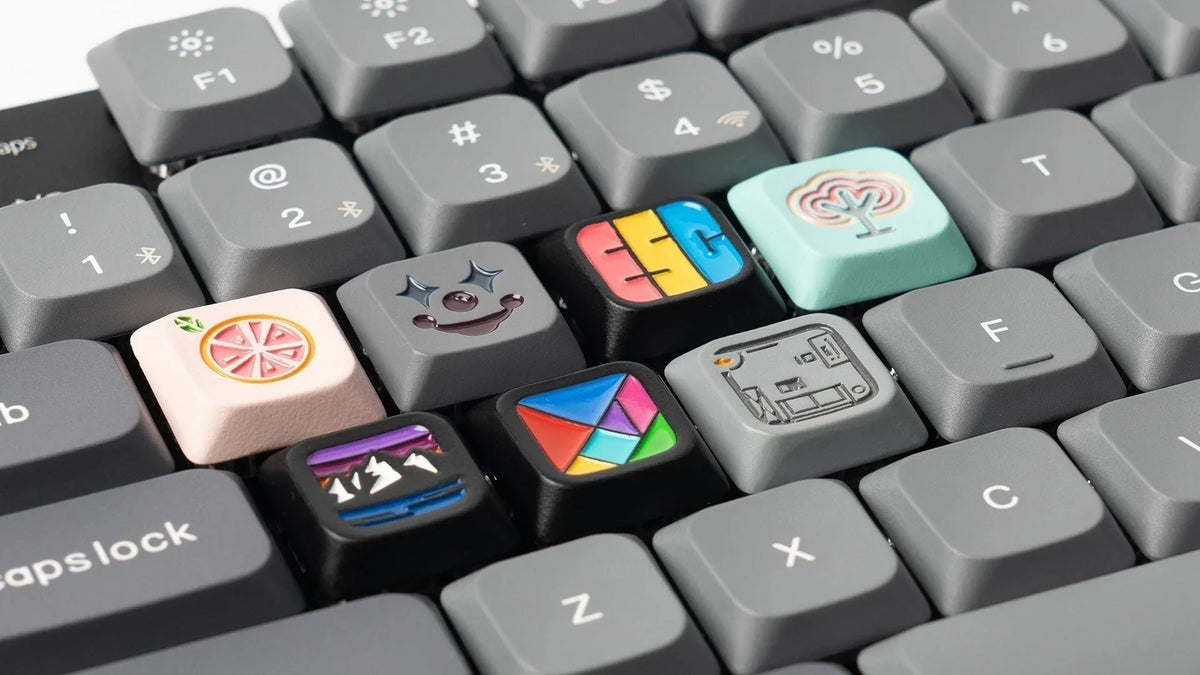
For many computer users, keycaps are one of the most overlooked parts of a keyboard. While switches and keyboard layouts often receive more attention, keycaps directly influence how a keyboard feels, sounds, and looks during daily use. Whether you are a mechanical keyboard enthusiast, a gamer looking for better control, or an office user typing thousands of words every week, choosing the right keycaps can significantly improve your overall experience.
Modern keycaps are available in different materials, shapes, manufacturing methods, and designs. Understanding these differences helps users select keycaps that match their typing habits, keyboard layout, and personal preferences.
What Are Keycaps and What Role Do They Play on a Keyboard?
Keycaps are the removable covers placed on top of mechanical keyboard switches. When you press a key, the keycap transfers your finger movement to the switch underneath, which then sends the input signal to your computer.
Although keycaps do not control the electrical function of a keyboard, they play an important role in the physical typing experience. The shape, texture, and material of a keycap can affect typing comfort, sound profile, and finger positioning.
For example, a programmer who types for eight hours daily may prefer textured PBT keycaps with a comfortable profile, while a competitive gamer might choose lightweight keycaps designed for faster finger movement and consistent key presses.
Many mechanical keyboard users customize their keyboards by replacing factory keycaps with aftermarket options. These upgrades allow users to personalize appearance while improving the feel of their keyboard. You can explore different styles and designs through collections of Keycaps designed for various mechanical keyboards.
What Types of Keycaps Are Available for Mechanical Keyboards?
Mechanical keyboard keycaps vary based on material, production method, and design style. The most common differences include standard versus custom keycaps, plastic materials, and printing techniques.
What Are Standard Keycaps and Custom Keycaps?
Standard keycaps are the keycaps included with most pre-built mechanical keyboards. They usually feature simple designs, common colors, and widely compatible layouts such as ANSI or ISO formats.
Custom keycaps are designed for users who want more personalization. They may include unique color combinations, themed designs, artisan keycaps, or special profiles. Mechanical keyboard communities often use custom keycaps to create keyboards that match their personality, workspace setup, or gaming environment.
For example, a graphic designer may choose a minimalist color scheme to match a professional desk setup, while a gaming enthusiast may select colorful keycaps with themed designs inspired by games or popular aesthetics.
What Are the Differences Between ABS and PBT Keycaps?
ABS and PBT are the two most common plastics used for keycap manufacturing. Each material offers a different balance of feel, cost, and durability.
| Feature | ABS Keycaps | PBT Keycaps |
| Material | Acrylonitrile Butadiene Styrene | Polybutylene Terephthalate |
| Surface Feel | Smooth and lightweight | Textured and slightly rough |
| Durability | Good for general use | Usually more resistant to wear |
| Shine Resistance | May develop shine faster | Typically maintains texture longer |
| Common Usage | Budget and gaming keyboards | Premium mechanical keyboards |
ABS keycaps are popular because they are affordable and can produce vibrant colors. However, frequent use may gradually create a smoother, shiny surface in high-contact areas such as the WASD or spacebar keys.
PBT keycaps are often preferred by keyboard enthusiasts because they tend to maintain their texture longer. According to keyboard community discussions and user feedback, many daily typists choose PBT keycaps because they provide a more consistent feel over years of use.
What Are Double-Shot, Dye-Sublimation, and Laser-Etched Keycaps?
The manufacturing method determines how legends (letters and symbols) are added to keycaps.
Double-shot keycaps are produced by molding two separate layers of plastic together. The legend is part of the keycap structure rather than printed on the surface, which helps maintain visibility after long-term use.
Dye-sublimation keycaps use heat to transfer dye into the plastic. This method allows detailed designs and is commonly used on high-quality PBT keycaps.
Laser-etched keycaps use laser technology to mark legends onto the surface. They are commonly found on many mainstream keyboards, although the appearance may change after extended use depending on the coating.
How Do Keycap Materials Influence Typing Experience and Durability?
The material of a keycap affects more than appearance. It also changes the sound, texture, and long-term performance of a keyboard.
Different plastics create different acoustic characteristics. For example, thicker PBT keycaps often produce a deeper and more solid sound, while thinner ABS keycaps may create a brighter sound profile.
The choice depends on personal preference. Some users enjoy the smooth feeling of ABS keycaps, while others prefer the textured surface of PBT for longer typing sessions.
How Does PBT Material Improve Keycap Performance?
PBT is considered a popular material among mechanical keyboard enthusiasts because it has strong resistance to heat, chemicals, and everyday wear.
For users who type extensively, such as writers, developers, and customer service professionals, PBT keycaps can help maintain a consistent surface texture over time. The material is also commonly used for premium aftermarket keycap sets because it supports durable legends and detailed designs.
Why Do Some Keycaps Develop Shine Over Time?
Keycap shine happens when repeated contact from fingers gradually changes the surface texture of the plastic.
Areas that receive the most usage, such as frequently pressed letters, may become smoother and reflect more light. This is especially common with ABS keycaps because the surface can polish from repeated friction.
However, shine does not necessarily mean a keycap is unusable. Many users continue using shiny keycaps for years because the change mainly affects appearance rather than functionality.
What Are Keycap Profiles and Which One Should You Choose?
Keycap profile refers to the shape and height arrangement of keycaps across different keyboard rows. The profile affects finger movement, typing angle, and overall comfort.
Different users may prefer different profiles depending on typing style and keyboard layout.
| Profile | Characteristics | Suitable For |
| Cherry | Lower height with ergonomic shape | Daily typing and gaming |
| OEM | Common factory profile | General users and beginners |
| SA | Tall and sculpted design | Enthusiasts who prefer a classic feel |
| XDA | Uniform height across rows | Custom layouts and creative designs |
What Are Cherry, OEM, SA, and XDA Keycap Profiles?
Cherry profile is widely popular among mechanical keyboard enthusiasts. Its lower height and sculpted shape provide a comfortable typing experience for many users.
OEM profile is one of the most common profiles included with commercial mechanical keyboards. It offers a familiar feel and works well for general users.
SA profile features a taller design with a rounded shape. Some users enjoy its retro appearance and distinctive typing sound.
XDA profile uses a uniform height design, meaning all rows have similar dimensions. This makes it popular among users who prefer visual consistency and custom artwork.
How Does Keycap Height Affect Typing Comfort?
Keycap height influences how much your fingers move between keys. Lower profiles may feel faster for some users, while taller profiles can provide a more traditional mechanical keyboard experience.
For example, a gamer who frequently presses movement keys may prefer lower-profile keycaps for quick transitions, while a writer may enjoy a sculpted profile that naturally guides fingers between rows.
There is no single profile that works best for everyone. Testing different profiles is often the best way to find the most comfortable option.
How Can You Customize Your Keyboard with the Right Keycaps?
Replacing keycaps is one of the easiest ways to personalize a mechanical keyboard. Unlike changing switches or modifying the internal components, keycap replacement usually requires only a keycap puller and a compatible set.
Before purchasing keycaps, users should consider compatibility, layout, switch type, and intended usage.
How Do You Choose Keycaps Based on Keyboard Layout and Switch Type?
Most mechanical keyboards use MX-style switches with a cross-shaped stem, making them compatible with many aftermarket keycaps.
However, users should check keyboard layout before buying. Compact keyboards such as 60%, 65%, and 75% layouts may require specific key sizes, while full-size keyboards usually support standard keycap sets.
What Should You Consider When Buying Keycaps for Gaming or Office Use?
Gaming users often prioritize fast response, comfortable finger placement, and designs that improve visibility.
Office users may focus more on long-term comfort, noise level, and durability. A textured PBT keycap set with an ergonomic profile can be a practical choice for people who spend many hours typing.
Conclusion
Keycaps are more than decorative accessories. They influence typing comfort, keyboard sound, durability, and personalization options. Understanding keycap materials, profiles, and manufacturing methods helps users make better decisions when upgrading their mechanical keyboards.
Whether you prefer durable PBT keycaps, colorful custom designs, or a specific typing profile, choosing the right keycaps can transform the overall keyboard experience.
FAQs
Are all keycaps compatible with mechanical keyboards?
Not all keycaps are universally compatible. Most mechanical keyboards using MX-style switches support common keycap sets, but users should check switch type, layout, and key sizes before purchasing.
What is the best keycap material for everyday typing?
PBT keycaps are a popular choice for everyday typing because they generally maintain their texture longer and provide a consistent feel. However, some users prefer ABS keycaps because of their smoother surface and wider color options.
How often should you replace your keyboard keycaps?
There is no fixed replacement schedule. Many users replace keycaps when they notice wear, changes in texture, faded legends, or simply want a new keyboard appearance. With proper care, high-quality keycaps can last for many years.