
The AI image market is no longer short of generators. The harder question is what happens after a creator already has a useful image but needs a different version of it. A product photo may need a cleaner background. A portrait may need a new editorial mood. A social media post may need a more polished visual style without losing the original subject. That is where Image to Image becomes interesting: it treats the uploaded image as the starting point, not as an afterthought.
This matters because many real creative jobs do not begin with a blank canvas. They begin with imperfect but valuable material. A marketer has a product shot. A designer has a rough concept. A creator has a portrait, a room photo, or a visual reference that almost works. The practical question is not “Can AI generate something?” but “Can AI help turn this specific image into something more usable?”
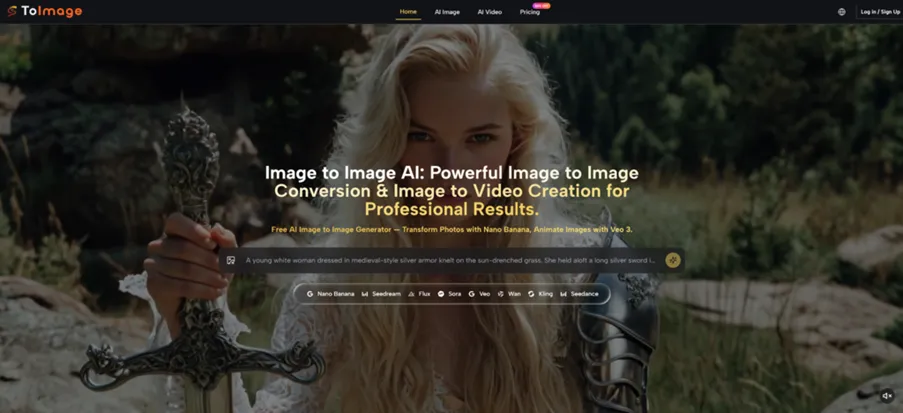
For this review, I looked at the platform from the angle of workflow efficiency. Instead of judging it like a gallery of beautiful outputs, I focused on whether it helps users move from an existing visual asset to a controlled creative variation. That means looking at the input process, the role of the prompt, the type of results users can reasonably expect, and the limitations that still make human judgment necessary.
Why Existing Images Are Better Starting Points
A blank prompt gives freedom, but it also creates uncertainty. If the user writes a prompt for a product shot, the model has to imagine the object, lighting, angle, background, and style all at once. If the user begins with an actual image, the AI has more visual information to work from.
This is the core advantage of reference-based creation. The uploaded image carries structure: subject placement, object proportions, color relationships, and visual context. The prompt then acts more like creative direction than full scene construction.
The Workflow Solves A Real Production Problem
Many creators are not trying to invent a completely new picture every time. They want to keep one part of the image and change another. They may want to preserve the product while changing the scene, keep a person recognizable while changing the outfit mood, or maintain the composition while testing a different style.
The Main Benefit Is Controlled Variation
The most useful part of the platform is not just generation speed. It is the ability to produce variations that remain connected to an original asset. From a practical user perspective, that makes the tool more useful for repeatable content work than a pure novelty generator.
How The Official Process Guides The User
The official process is direct and simple. It is built around uploading an image, describing the desired transformation, and generating a new version. That simplicity is important because the platform appears designed for creators, marketers, and everyday users rather than technical image engineers.
Step One Start With A Visual Reference
The user first uploads the image they want to transform. This image becomes the visual base for the AI process, giving the system something concrete to analyze.
The Uploaded Image Reduces Guesswork
The source image can communicate details that are hard to describe in text, such as facial proportions, product form, pose, perspective, or scene layout. This makes the starting point clearer than a text-only prompt.
Step Two Explain The Needed Transformation
The user then writes a prompt describing what should change. The prompt may ask for a different style, background, mood, level of polish, or visual interpretation.
Clear Instructions Improve The Result
The platform still depends on the quality of the user’s direction. A broad prompt can lead to broad results. A specific prompt gives the AI a better chance of understanding what to preserve and what to modify.
Step Three Generate And Review The Output
After the prompt is submitted, the AI generates a transformed version of the original image. The user can then judge whether the result fits the goal and adjust the prompt if needed.
Iteration Is Part Of The Workflow
The first result may be useful, but complex visuals can require multiple attempts. This is normal for AI image transformation, especially when the image includes faces, hands, text, detailed products, or busy backgrounds.
Testing The Tool Through Real Scenarios
The best way to understand the platform is to think in scenarios. A casual user may only want a fun style change, but a working creator usually needs more. They need a visual that can support a post, a campaign, a product page, or a concept presentation.
In a product image scenario, the challenge is preserving the main object while changing the surrounding environment. This is where the uploaded image helps. The product shape and framing already exist, so the prompt can focus on mood, background, or presentation. The result may still need review, but the workflow feels more practical than asking a model to invent the entire product from words.
In a portrait scenario, the challenge is consistency. A user may want a new atmosphere while keeping the subject visually familiar. Image to Image AI is useful here because the source image gives the AI a reference for the person, although strong identity preservation still depends on careful prompting and may vary from output to output.
Social Content Creation Feels Especially Natural
Social media work often requires fast visual variation. A creator may want the same image reworked into a cinematic look, a cleaner studio style, a seasonal design, or a more polished campaign visual. The platform fits this use case because the user does not need to rebuild the image concept from nothing.
The Best Outputs Need A Clear Art Direction
For social content, the user should describe the final mood clearly. Terms like lighting, background, composition, realism, and style help guide the result. The platform gives the structure, but the user’s creative direction still shapes the quality.
A Practical Comparison For Visual Production
The platform is best understood as a middle layer between simple AI generation and professional manual editing. It is not as precise as expert retouching software, but it is much faster for creative exploration and variation.
| Review Factor | Toimage Style Workflow | Text Only Image Tools | Manual Design Software |
| Starting material | Existing image plus prompt | Prompt only | Existing file plus manual edits |
| Best strength | Fast visual reinterpretation | New concept exploration | Precision and control |
| User effort | Low to moderate | Low | Moderate to high |
| Creative consistency | Better when source image matters | More likely to drift | Depends on user skill |
| Ideal user | Creators with existing visuals | Users exploring from scratch | Designers needing exact edits |
| Main limitation | Results can require retries | Harder to control details | Slower learning curve |
Where The Experience Still Needs Patience
The platform should be used with realistic expectations. AI image transformation is powerful, but it is not the same as guaranteed professional retouching. Some outputs may change details the user wanted to preserve. Some prompts may produce results that are visually interesting but not fully accurate.
This is especially true for complex source images. A crowded street, a detailed product label, a hand holding an object, or a face under unusual lighting can make the task harder. The result may appear strong at first glance but still need closer inspection.
Prompt Quality Directly Affects The Outcome
The user’s prompt is not a minor detail. It is the main control layer. If the prompt does not clearly define what should stay and what should change, the result can drift.
Preservation Instructions Should Be Explicit
A stronger prompt might say to keep the same subject, maintain the original camera angle, preserve facial structure, or retain the product’s shape. These instructions do not guarantee perfection, but they give the AI a more specific target.
Who Will Get The Most Value
The platform is most useful for people who already have image assets and need to create variations quickly. That includes content creators, small business owners, marketers, e-commerce sellers, visual planners, and designers who want to test directions before committing to manual editing.
It is less ideal for tasks requiring exact pixel-level control, guaranteed text accuracy inside images, or one-click perfection. In those cases, users should treat the output as a draft, concept, or creative direction rather than final production without review.
The real promise is not that the platform removes the creator from the process. It works better when the creator stays involved: choosing the source image, writing a specific prompt, judging the result, and refining the direction. Used that way, it becomes a practical tool for turning existing images into new creative possibilities without starting over every time.