
Getting Locked Out Of Your Own Phone Is Honestly One Of The Most Annoying Things That Can Happen. Maybe You Changed Your Pattern Lock And Blanked On It The Next Morning Or Perhaps You Bought A Used Phone Only To Realize It’s Stuck On A Google Account Screen. This Is Exactly Why Android Fastboot Reset Tool Exists. They’re Basically A Digital “backdoor” That Lets Your Computer Talk To Your Phone’s Hardware When The Screen Is Locked Tight.
Think Of These Tools As A Bridge. When Your Phone Is In That Weird “fastboot” Mode—you Know The One With The Little Android Robot—it’s Waiting For Specific Commands. These Tools Take Those Complicated Strings Of Code And Turn Them Into Simple Buttons. You Don’t Need To Be A Software Engineer To Use Them; You Just Need A Steady Usb Cable And A Bit Of Patience.
Why You Need Reliable Android Fastboot Reset Tool
We’ve All Been There—you Do A Factory Wipe To Speed Things Up But Then The Phone Demands A Gmail Login You Haven’t Used In Three Years. That’s Factory Reset Protection (frp) Doing Its Job But It’s A Nightmare For Legitimate Owners. Having Android Fastboot Reset Tool On Your Pc Is Like Having A Spare Key To Your House. It Allows You To Bypass Those Security Walls That Would Otherwise Cost You Usd 50 At A Repair Shop.
It’s Not Just About Bypassing Locks Though. If Your Phone Is Stuck In A Loop Where It Won’t Stop Restarting Or If You’re Trying To Unlock Bootloader Settings To Try Out A Custom Operating System These Tools Are Your Best Friend. They Give You A Level Of Control Over Your Hardware That The Manufacturers Usually Try To Hide From The Average User.
Getting Your Device Ready: The Connection Phase
First Things First: Your Computer Won’t See Your Phone Unless You Have The Right Drivers. Whether It’s Qualcomm Mediatek Or Spreadtrum You’ve Got To Get Those Installed First. Once That’s Sorted Turn Your Phone Off And Hold The Volume Down And Power Buttons. When You See That Fastboot Screen Plug It Into Your Pc. Pro Tip: Use A High-quality Cable. Cheap Gas Station Cables Often Fail Midway And That’s A Great Way To Accidentally “brick” Your Phone.
Check Device (Fastboot Mode) For Stability
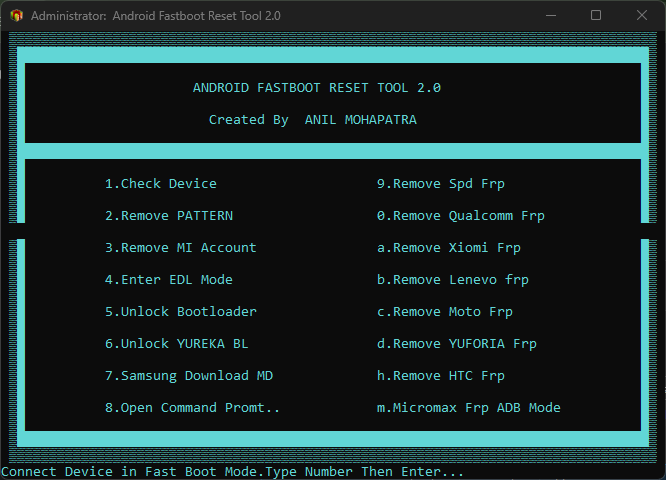
Before You Start Wiping Anything Hit The Check Device (fastboot Mode) Button. It’s A Quick Sanity Check. If A Serial Number Pops Up In The Tool’s Window You’re Good To Go. If It Stays Blank Don’t Keep Clicking Other Buttons—it Just Means Your Connection Isn’t Solid Yet. Swap The Cable Or Try A Different Usb Port Until That Serial Number Shows Up.
Breaking Down Frp Removal By Chipset And Brand
The Cool Thing About These Tools Is That They Aren’t “One Size Fits All.” Different Brands Hide Their Security In Different Places. If You Need To Remove Moto Frp Or Remove Lenovo Frp The Software Knows Exactly Which Tiny Corner Of The Memory To Wipe. It’s A Surgical Strike—it Clears The “I’m Locked” Flag Without Touching Your Actual Android Operating System.
This Brand-specific Logic Is Why The Success Rate Is So High. Whether You’re Looking To Remove Xiaomi Frp Or Remove Htc Frp The Tool Basically Tells The Phone “hey Forget About That Old Google Account Start Fresh.” It’s Incredibly Fast Too; Once The Command Is Sent The Lock Is Usually Gone In Under Five Seconds.
Dealing With Remove Qualcomm Frp And Edl Mode
If You’ve Got A Snapdragon-powered Device You Might Need To Enter Edl Mode. This Is “emergency Download Mode” And It’s A Bit More Advanced. It Allows For A Remove Qualcomm Frp Process That Works Even If The Standard Fastboot Commands Are Being Blocked By The System. It’s The Ultimate “last Resort” For Professional Technicians When Nothing Else Is Working.
Advanced Security: Unlocking Bootloaders And Mi Accounts
Xiaomi Users Have An Extra Hurdle: The Mi Account Lock. It’s A Lot “stickier” Than A Google Lock Because It’s Tied To The Hardware Id. However These Tools Often Have A Specific Module To Remove Mi Account Prompts. It Effectively Disables The Background Check That Keeps The Phone Locked Letting You Back Into The Home Screen So You Can Actually Use The Device You Paid For.
For The Real Tech Enthusiasts The Ability To Unlock Bootloader Or Specifically Unlock Yureka Bootloader Is The Main Attraction. It’s The First Step To Rooting Your Phone Or Installing A Totally Different Version Of Android. Just A Heads-up: This Will Wipe Every Single Photo And Message On The Phone So Don’t Do It Unless You’ve Backed Up What You Need.
Troubleshooting Common Connection And Driver Issues
It’s Almost A Rite Of Passage To Run Into A “Waiting For Device” Error. Usually It’s Just Windows Being Stubborn With Drivers. If You’re Working With Older Stuff Like A Micromax Frp (adb Mode) Or Trying To Remove Yuforia Frp You Might Have To Try A Few Different Usb Ports. Older Phones Can Be Picky About Whether They’re Plugged Into A Usb 2.0 Or 3.0 Slot.
If You’re On Windows 10 Or 11 You Might Even Need To Disable “Driver Signature Enforcement.” It Sounds Technical But It’s Just A Setting That Lets You Install The Specialized Repair Drivers The Tool Needs. Once Those Drivers Are Active The Tool Will Recognize The Phone Instantly And You’ll Be Off To The Races.
Using The Open Command Prompt For Manual Fixes
If The Automated Buttons Aren’t Doing It For You There’s Always The Open Command Prompt Option. This Is For When You Want To See Exactly What’s Happening Behind The Scenes. You Can Type In Manual Commands Like Fastboot Erase Config To Clear An Frp Lock Yourself. It’s A Great Way To Learn How The Process Actually Works Instead Of Just Clicking A Button And Hoping For The Best.
Choosing Between The Android Multi Tool And Fastboot Specific Options
When You’re Staring At A Locked Screen You Might Wonder Whether To Grab A Specialized Utility Or A More General One Like The Android Multi Tool. Think Of The Android Fastboot Reset Tool As A Specialized Wrench—it’s Designed To Do One Thing (Fastboot Resets) And Do It Perfectly. On The Other Hand A “multi Tool” Is More Like A Swiss Army Knife. It Usually Includes Adb Functions That Work While The Phone Is Powered On Allowing You To Reset Things Like Gesture Locks Or Face Ids Without Always Needing To Be In That Specific Fastboot Mode.
If Your Phone Is Totally Stuck On A Logo Or Won’t Even Boot Past The Security Screen The Android Fastboot Reset Tool Is Often Your Best Bet Because It Communicates With The Hardware At A Deeper Level. However If You’re Just Trying To Clear A Simple Pattern Lock Or A Pin While The Phone Is Still “Alive” The Android Multi Tool Gives You A Broader Range Of Options. Most Technicians Keep Both On Their Desktop Because One Might Succeed Where The Other Fails Depending On The Specific Security Patch Your Phone Is Running.
Frequently Asked Questions (FAQs)
Will I Lose My Data Using These Tools?
Yes 100%. Any Time You Reset A Lock Or An Frp Partition The Phone Has To Wipe Itself For Security. There’s Really No Way To Keep Your Photos If You’re Locked Out.
Is This Software Free?
Generally Yes. Most Technicians Use These As Free Utilities. If Someone Is Trying To Charge You For The Tool Itself You’re Probably Looking In The Wrong Place.
What If My Phone Isn’t Listed?
Try The “generic” Or “Qualcomm” Tab. Many Phones Use The Same Internal Chips So A Tool Designed For One Brand Might Still Work On Yours If The Hardware Is Similar.
Conclusion
At The End Of The Day Having An Android Fastboot Reset Tool In Your Digital Toolkit Is Just Smart If You Deal With A Lot Of Phones. They Turn A Stressful “I’m Locked Out” Situation Into A Five-minute Fix. Whether You’re Helping A Friend Who Forgot Their Password Or Fixing A Second-hand Xiaomi Phone These Tools Make The Whole Process Straightforward. Just Take Your Time Get Your Drivers Right And You’ll Be Back Into Your Phone Before You Know It.